TL;DR
- Scope: VMware Cloud Foundation 9.0.0.0 GA (primary platform build 24703748) and the associated 9.0 GA BOM levels for key components:
- SDDC Manager: 9.0.0.0 build 24703751
- vCenter: 9.0.0.0 build 24755230
- ESXi: 9.0.0.0 build 24755229
- NSX: 9.0.0.0 build 24752083
- VCF Operations: 9.0.0.0 build 24705084
- VCF Operations Fleet Management: 9.0.0.0 build 24704881
- VCF Automation: 9.0.0.0 build 24786202
- VCF Identity Broker: 9.0.0.0 build 24786209
- Your topology decision is really about failure domains:
Single site -> simplest operations.
Two sites in one region -> availability engineering (stretched networking and usually stretched storage).
Multi-region -> disaster recovery engineering (asynchronous replication + runbooks). - Your identity decision is a blast radius decision:
Fleet-wide Single Sign-On (SSO) maximizes convenience, but centralizes login impact.
Instance-level SSO shrinks blast radius, but increases operational overhead. - Operational punchline: Choose topology and SSO model as day-0 decisions, because your day-2 posture (change windows, incident scope, and who gets paged) is set by those boundaries.
Architecture Diagram
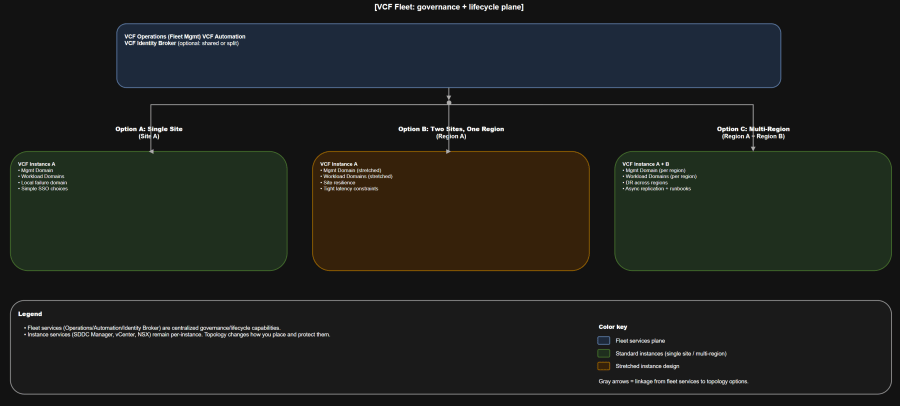
Table of Contents
- Scope and terminology guardrails
- Assumptions
- Decision criteria
- Challenge
- Solutions
- Identity boundaries
- Who owns what
- Version compatibility matrix
- Architecture tradeoff matrix
- Failure domain analysis
- Day-0, day-1, day-2 action map
- Operational runbook snapshot
- Validation
- Troubleshooting workflow
- Anti-patterns
- Summary and takeaways
- Conclusion
Scope and terminology guardrails
You will move faster as an organization if you treat these as non-negotiable guardrails:
- Fleet is your centralized governance and lifecycle scope for fleet-level services (for example, VCF Operations and VCF Automation).
- Instance is a discrete VCF deployment unit with its own instance-level management components.
- Domains (management domain and VI workload domains) are lifecycle and isolation boundaries inside an instance.
- Clusters are the scaling unit inside a domain.
For topology conversations, you also need consistent physical vocabulary:
- Region is one or more physical sites in a single metro area, typically aligned to synchronous replication latencies.
- Single site is a single fault domain at some layer (power, HVAC, core network, etc.), even if you have multiple racks.
- Multiple sites in a single region is an availability pattern, usually implemented with stretched clusters.
- Multiple sites across multiple regions is a disaster recovery pattern. Treat it as DR engineering, not “metro HA, but farther away”.
Assumptions
- You are designing for VCF 9.0.0.0 GA (not 9.0.x maintenance releases).
- You are greenfield for VCF bring-up.
- You plan to deploy both VCF Operations and VCF Automation from day-1.
- You want to support three topology postures:
- Single site
- Two sites in one region
- Multi-region
- You need to support two identity postures:
- Shared identity and shared SSO boundary where appropriate
- Separate SSO boundaries for regulated isolation where required
Decision criteria
Use these criteria to keep topology and identity debates grounded in operational outcomes:
- Availability objective
- Are you trying to survive host/rack failures, or a full site loss?
- Do you need “continue running” vs “recover quickly”?
- Latency reality
- Two sites in one region implies tight latency constraints and resilient inter-site networking.
- Multi-region implies you are in DR territory, not synchronous HA territory.
- Isolation and compliance
- Do you need separate admin planes and authentication boundaries for regulated workloads?
- Operational model
- Can your teams support stretched designs (storage, networking, failure testing)?
- Do you have the maturity to run parallel instances and DR runbooks?
- Scale and growth
- Will you scale by adding clusters, adding domains, or adding instances?
- Are you trying to cap blast radius for lifecycle events?
Challenge
You need a topology and identity posture that:
- Matches real failure domains (host, rack, site, region)
- Keeps lifecycle operations predictable (patching, certificates, identity changes)
- Makes ownership clear (platform team vs VI admins vs app/platform teams)
- Avoids accidental coupling (shared services that turn into shared outages)
Solutions
Solution A: Single site
When it fits
- You want the fastest path to a stable VCF 9.0 platform.
- Your highest-probability failures are host and rack, not full-site loss.
- You want to minimize “distributed systems” complexity in your management components.
What it looks like operationally
- One fleet, one instance, one site.
- You still separate management domain and workload domains early so lifecycle and security boundaries stay clean.
- If you adopt “minimal footprint” patterns, validate whether your VCF Automation tenancy model requires a second cluster for scale and availability.
Failure posture
- You can engineer strong resilience for component and host failures.
- Site loss is usually an outage unless you build a separate recovery site (which becomes Solution C).
Day-2 characteristics
- Lowest overhead for upgrades and identity changes.
- Lowest number of moving parts to test during maintenance windows.
Solution B: Two sites in one region
When it fits
- You need resilience across two facilities in the same metro area.
- You can meet the networking and storage requirements to operate stretched designs reliably.
- You accept more complex failure testing and more disciplined change management.
What it looks like operationally
- Usually one fleet and one instance spanning two sites in a single region.
- Stretched clusters are used to increase availability across sites.
- Expect “site affinity” considerations for key components and edge services, plus explicit failover capacity planning.
Failure posture
- Well-designed two-site patterns can tolerate a single site loss for some tiers of workloads.
- Your success depends on:
- Inter-site link design (bandwidth, latency, convergence)
- First-hop gateway failover behavior
- Your storage model (stretched vs replicated)
- A tested operational runbook
Day-2 characteristics
- Higher operational toil:
- More health dependencies (link stability, witness placement, routing)
- Higher change risk if you treat the stretched fabric casually
- Upgrade impact can be broader if maintenance touches shared stretched components.
Solution C: Multi-region
When it fits
- You need regional survivability and a credible DR story.
- You accept asynchronous replication and DR orchestration as first-class requirements.
- You can operationalize regular failover testing.
What it looks like operationally
- One fleet with multiple instances, typically aligning instances to regions.
- Each region runs its own instance-level management components for that instance.
- You add replication and failover solutions on top (data replication is not “free” just because you have two regions).
Failure posture
- Region loss becomes a recovery process, not an HA event.
- Your RPO/RTO is determined by:
- Replication technology and mode (async, periodic)
- Runbook execution time (automation maturity)
- DNS, identity, and access dependencies
Day-2 characteristics
- More upgrade surface area:
- More instance-level stacks to patch and validate
- More compatibility and sequencing to track
- More change management work:
- Cross-region DR testing, runbook maintenance, replication monitoring
Identity boundaries
VCF 9.0 gives you flexibility in how far you extend SSO convenience. Your decision should be explicit, because it determines operational coupling.
Identity design-time decisions that matter
- Do you want fleet-wide login convenience or per-instance blast radius control?
- Do you need one identity provider across the fleet, or separate identity sources for isolation?
- Do you need a highly available Identity Broker deployment model for scale and resilience?
Challenge
You want a clean login experience for operators and consumers, without turning identity into a single point of operational failure.
Solutions
Solution A: Fleet-wide Single Sign-On
Best for
- A single platform operations team supporting multiple instances
- Environments where cross-instance operations are common
- Organizations optimizing for ease of use and consistent access patterns
Operational reality
- One Identity Broker scope can service all instances within a fleet (large convenience scope).
- This can create a larger login blast radius if the Identity Broker service is unhealthy or unavailable.
Day-2 implications
- Identity changes become high-impact changes.
- You must run solid backup, restore, and certificate practices for identity components.
Solution B: Instance-level Single Sign-On
Best for
- Regulated isolation
- Multi-tenant environments where identity boundaries must map to tenant boundaries
- Organizations optimizing for smaller incident scope
Operational reality
- You accept more overhead (more identity configurations to manage).
- You gain containment: login impact is limited to the instance.
Day-2 implications
- More repeated work during identity provider changes
- More places to validate role mappings and permissions
Solution C: Cross-instance Single Sign-On segmentation
Best for
- A practical middle ground
- You want to group instances by risk domain (for example, production vs regulated)
Operational reality
- Multiple Identity Broker instances serve defined subsets of instances in the same fleet.
- You reduce login blast radius versus a single shared Identity Broker, but still gain some cross-instance convenience.
Rollback and safety notes for identity
Identity changes are rarely “undo-able” in a clean way.
Operational behaviors to plan for:
- Resetting or deregistering SSO can remove provisioned users and groups and may be irreversible for the removed identities.
- Even after configuring SSO centrally, you often still need to log in to individual components and assign roles and permissions for users and groups.
Treat identity changes as:
- A change window item with defined blast radius
- A runbook with an explicit backout plan (often “restore from backup” rather than “click undo”)
Who owns what
Use this chart to stop ownership drift before it becomes incident fuel.
| Capability / Task Area | Platform team (fleet) | VI admin (instance + domains) | App/platform teams (consumers) |
|---|---|---|---|
| Fleet topology decisions (fleet count, instance strategy) | Own | Consult | Inform |
| VCF Operations + Fleet Management lifecycle | Own | Consult | Inform |
| VCF Automation lifecycle and platform guardrails | Own | Consult | Consult |
| Identity Broker and SSO model selection | Own | Consult | Inform |
| Identity provider integration and federation policy | Own | Consult | Inform |
| Instance bring-up, SDDC Manager health | Consult | Own | Inform |
| Management domain operations (vCenter/NSX for mgmt) | Consult | Own | Inform |
| Workload domain lifecycle (create/expand/delete) | Consult | Own | Inform |
| Network services consumption (projects, VPCs, templates) | Guardrails | Provide capacity | Own |
| Workload placement, sizing, app RTO/RPO | Guardrails | Provide platform SLAs | Own |
| DR runbooks for workloads | Provide platform primitives | Support infra failover | Own (execute + validate) |
Version compatibility matrix
This matrix is here to reduce ambiguity in architecture reviews and incident calls.
| Component | Role in the model | 9.0 GA version | 9.0 GA build |
|---|---|---|---|
| VMware Cloud Foundation | Platform level | 9.0.0.0 | 24703748 |
| SDDC Manager | Instance mgmt | 9.0.0.0 | 24703751 |
| vCenter | Domain mgmt | 9.0.0.0 | 24755230 |
| ESXi | Host layer | 9.0.0.0 | 24755229 |
| NSX | Network virtualization | 9.0.0.0 | 24752083 |
| VCF Operations | Fleet-level ops | 9.0.0.0 | 24705084 |
| VCF Operations Fleet Management | Fleet lifecycle plane | 9.0.0.0 | 24704881 |
| VCF Automation | Fleet-level consumption | 9.0.0.0 | 24786202 |
| VCF Identity Broker | Identity plane | 9.0.0.0 | 24786209 |
Architecture tradeoff matrix
Use this table in design boards to turn opinions into tradeoffs.
| Attribute | Single site | Two sites in one region | Multi-region |
|---|---|---|---|
| Primary goal | Operational simplicity | Site resilience (metro) | Regional survivability (DR) |
| Typical instance count | 1 | 1 | 2+ |
| Data protection posture | Local HA + backups | Often synchronous within region | Asynchronous replication + DR |
| Network demands | Standard DC | Stretched, resilient inter-site | L3 between regions + DR routing/DNS |
| Change risk | Lowest | Medium to high | High (more components) |
| Upgrade impact | Smallest | Broader (shared stretched deps) | Broadest (multiple instances) |
| Identity blast radius | Depends on SSO model | Depends on SSO model | Higher if identity is centralized |
| Best for | Getting started, most orgs | Metro availability | Regulated DR, geo resilience |
Failure domain analysis
You need a shared language for “what breaks what”:
- Fleet service incident (Operations/Automation/Identity Broker)
Impacts governance, provisioning workflows, centralized observability, and potentially login flows (depending on your SSO model).
It does not automatically mean instance-level vCenter or NSX is down. - Instance incident (SDDC Manager, management domain services)
Impacts domain lifecycle operations and management workflows for that instance. Workloads may keep running, but lifecycle and orchestration stop being safe. - Domain incident (a workload domain vCenter/NSX, or cluster issues)
Impacts workloads in that domain. Other domains and instances can remain healthy.
Now map that to topology:
- Single site: Failure domains are clean, but “site loss” is still a hard stop unless you add DR.
- Two sites in one region: Link failure and split-brain conditions become first-class failure modes.
- Multi-region: DR orchestration and identity dependencies become the most common hidden risk.
Day-0, day-1, day-2 action map
Day-0 decisions
These are the “you will regret not deciding early” items:
- Topology pattern: single site vs dual site vs multi-region
- Scaling strategy: add clusters vs add domains vs add instances
- SSO model: fleet-wide vs instance-level vs segmented cross-instance
- Where fleet services live, and how you protect them
- Certificate authority strategy and renewal model
- Backup and restore posture for:
- VCF Operations + Fleet Management
- VCF Automation
- Identity Broker
- SDDC Manager and management vCenter/NSX
Day-1 actions
Day-1 is “build the platform safely”:
- Deploy and configure VCF Installer (new in VCF 9.x lineage vs older Cloud Builder workflows).
- Bring up the first instance and management domain.
- Deploy fleet services (Operations and Automation) to match your desired HA footprint.
- Configure Identity Broker and SSO model.
- Create initial workload domains and attach them to the consumption model you plan to support.
- For anything beyond baseline wizard-driven deployment (for example, specific network constructs), plan on JSON spec-driven deployment where required.
Day-2 operations
Day-2 is where topology decisions become either leverage or pain:
- Lifecycle management:
- Fleet services lifecycle
- Instance and domain lifecycle
- Governance and drift:
- Out-of-band changes are the fastest way to break day-2 workflows
- Capacity and scale:
- Add clusters to domains
- Add domains to instances
- Add instances to fleets (most often for geographic dispersal and isolation)
- Identity and certificates:
- Role mapping validation after identity changes
- Certificate renewal to avoid service disruption
- DR and resilience:
- Regular restoration testing for fleet services
- Runbook execution practice for multi-region
Operational runbook snapshot
Use this as a starting point and adjust to your org’s risk model.
Minimum viable backup posture
- Back up fleet services and identity:
- VCF Operations + Fleet Management
- VCF Automation
- Identity Broker
- Back up instance-level management:
- SDDC Manager and management vCenter/NSX
Starting targets you can use when leadership asks “what’s good enough”:
- Fleet services (Operations/Automation/Identity):
- RPO: 24 hours (starter), 4 hours (mature), 1 hour (high-critical)
- RTO: 4-8 hours (starter), 2-4 hours (mature), under 2 hours (high-critical)
- Workload domains (apps):
- RPO and RTO should be app-tier driven, not “platform averages”
Identity provider change runbook
- Pre-change:
- Confirm break-glass access to each component
- Export role mappings and admin group membership
- Confirm backups exist for identity components
- Change:
- Implement identity provider change in the selected SSO model scope
- Re-validate role mapping per component (vCenter, NSX, Operations, Automation)
- Post-change:
- Validate login across:
- Fleet UI
- Instance components
- Automation portals
- Update documentation and on-call procedures
- Validate login across:
Validation
Use validation as your “trust but verify” step after topology or identity work.
Before you declare success, validate:
- DNS resolution for all management endpoints
- NTP sync consistency across fleet services and instance services
- Login paths:
- Fleet services
- vCenter and NSX
- Automation portals
- Health and connectivity:
- VCF Operations cluster health
- Automation cluster health
- Identity Broker health
Use the following commands to validate the basics from a jump host.
Run these DNS and connectivity checks:
# DNS resolution
nslookup vcf-ops-fqdn.example.com
nslookup vcf-automation-fqdn.example.com
nslookup vcenter-mgmt-fqdn.example.com
nslookup nsx-mgmt-fqdn.example.com

# TLS reachability (headers only)
curl -kI https://vcf-ops-fqdn.example.com/
curl -kI https://vcf-automation-fqdn.example.com/
curl -kI https://vcenter-mgmt-fqdn.example.com/
curl -kI https://nsx-mgmt-fqdn.example.com/
Troubleshooting workflow
When something breaks, your first job is to identify which boundary you are in.
Step-by-step triage
- Step 1: Is this a login issue or a lifecycle issue?
- Login failures often point to identity scope or identity broker health.
- Lifecycle failures often point to fleet management services or instance manager state.
- Step 2: Is impact fleet-wide, instance-wide, or domain-only?
- Fleet-wide symptoms: multiple instances show the same governance or login issues.
- Instance-wide symptoms: one instance fails lifecycle tasks across its domains.
- Domain-only symptoms: a workload domain is isolated while other domains operate normally.
- Step 3: Validate time and certificates
- Time drift and certificate issues are repeat offenders in management plane failures.
- Fixing time and trust chains often restores otherwise “mysterious” behavior.
Common issues
- SSO works in one UI, fails in another
- Usually role mappings are incomplete in individual components even though SSO is configured centrally.
- Automation provisioning failures after identity changes
- Often stale user/group bindings or missing project/organization role bindings.
- Stretched design instability
- Often inter-site routing and gateway failover behavior, not “vSphere problems”.
Anti-patterns
Avoid these and you avoid most self-inflicted outages.
- Treating dual-site in one region like “simple HA”
- It is not simple. It is distributed systems engineering.
- Treating multi-region as “active-active by default”
- Multi-region is a DR posture unless you intentionally architect otherwise.
- Choosing fleet-wide SSO without an identity resilience plan
- Convenience without resilience becomes a fleet-wide login incident.
- Mixing regulated tenants into a shared identity boundary “for simplicity”
- That is an audit finding waiting to happen.
- Out-of-band changes without drift detection and an operational reconciliation practice
- This creates silent divergence between actual state and expected state.
Summary and takeaways
- Topology is a failure domain decision. Identity is a blast radius decision.
- Single site is the fastest path to a stable platform and clean day-2 operations.
- Two sites in one region is an availability posture that requires disciplined engineering and testing.
- Multi-region is a DR posture that requires replication, orchestration, and practiced runbooks.
- Fleet-wide SSO is about user experience. Instance-level SSO is about containment.
- Put the ownership model on paper early, or your incident bridge will do it for you.
Conclusion
VCF 9.0 becomes dramatically easier to operate when you explicitly separate topology decisions (site, region, instance placement) from governance decisions (fleet services) and then choose identity boundaries that match your isolation and resilience goals. Once you standardize these mental models, your teams can scale the platform without scaling confusion.
Sources
VMware Cloud Foundation 9.0 Documentation (TechDocs landing page): https://techdocs.broadcom.com/us/en/vmware-cis/vcf/vcf-9-0-and-later/9-0.html
VMware Cloud Foundation 9.0 Release Notes – Bill of Materials: https://techdocs.broadcom.com/us/en/vmware-cis/vcf/vcf-9-0-and-later/9-0/release-notes/vmware-cloud-foundation-90-release-notes/vmware-cloud-foundation-bill-of-materials.html
Design Blueprints for VMware Cloud Foundation 9.0: https://techdocs.broadcom.com/us/en/vmware-cis/vcf/vcf-9-0-and-later/9-0/design/blueprints.html
VCF Fleet-Wide Single Sign-On Model: https://techdocs.broadcom.com/us/en/vmware-cis/vcf/vcf-9-0-and-later/9-0/design/design-library/single-sign-on-models/-fleet.html
VCF Single Sign-On Models (Design Library index): https://techdocs.broadcom.com/us/en/vmware-cis/vcf/vcf-9-0-and-later/9-0/design/design-library/single-sign-on-models.html
VCF Installer Product Support Notes (VCF 9.0 Release Notes): https://techdocs.broadcom.com/us/en/vmware-cis/vcf/vcf-9-0-and-later/9-0/release-notes/vmware-cloud-foundation-90-release-notes/platform-product-support-notes/product-support-notes-installer.html
VMware Cloud Foundation Installer API Reference Guide: https://developer.broadcom.com/xapis/vcf-installer-api/latest
VMware Cloud Foundation API Reference Guide: https://developer.broadcom.com/xapis/vmware-cloud-foundation-api/latest