Introduction
The VMware replacement debate often begins with the wrong question.
Teams ask which hypervisor has live migration, high availability, snapshots, distributed switching, templates, role-based access control, or an API. Those comparisons are useful, but they address only the lowest visible layer of a much larger operating model.
A mature VMware estate is rarely just ESX hosts and virtual machines. It may include vCenter design, cluster policies, vSAN or external storage, NSX networking and distributed security, VCF Operations, VCF Automation, backup integrations, disaster recovery orchestration, hardware compatibility, lifecycle management, identity, logging, capacity planning, vendor certifications, support processes, and years of operator knowledge.
Replacing the hypervisor is a compute migration. Replacing the VMware operating model is a platform transformation.
That distinction matters in 2026 because the pressure to reconsider VMware is real, but the reasons vary. Some organizations are responding to subscription and packaging changes. Others are reducing vendor concentration, refreshing hardware, modernizing applications, or correcting years of infrastructure sprawl. Community discussions contain dramatic contract anecdotes and strong platform opinions, but those claims describe individual environments, not universal commercial or technical outcomes [29]-[31].
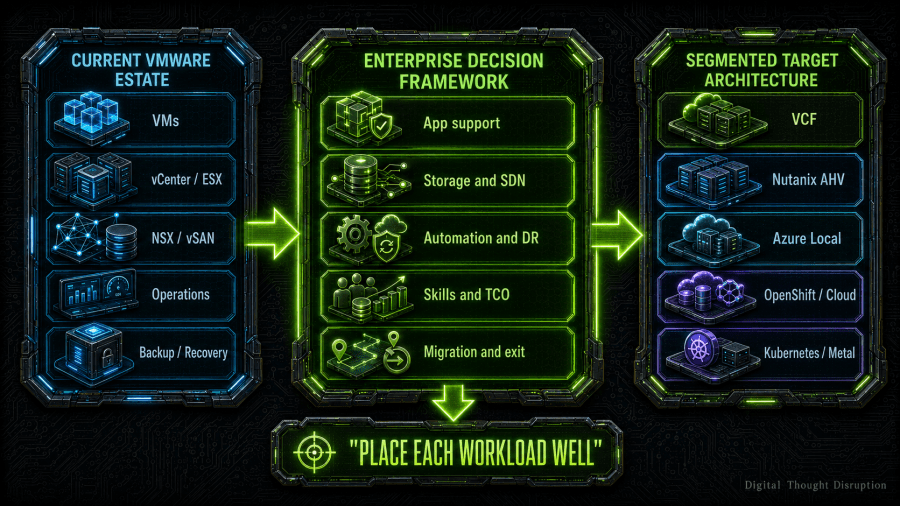
The enterprise decision is therefore not, “Which product replaces VMware?” The better question is, “Which combination of platforms gives each workload an acceptable support position, operating model, recovery posture, cost profile, and exit path?”
TL;DR
There is no universal VMware replacement in 2026.
VMware Cloud Foundation 9.1 remains a credible stay-and-modernize option when application support, operational continuity, NSX dependencies, advanced recovery, or migration risk outweigh licensing and concentration concerns. Nutanix AHV is often the strongest integrated private-cloud alternative. Azure Local is a strong fit when Azure Arc, Microsoft operations, and distributed infrastructure are strategic. Windows Server 2025 Hyper-V remains viable for organizations prepared to assemble and operate the surrounding management, storage, network, automation, and recovery stack.
Red Hat OpenShift Virtualization is best evaluated as a Kubernetes-first application platform that can also run VMs, not as a direct vSphere clone. Proxmox VE can deliver strong economics, openness, and practical virtualization, but enterprises must validate application certification, support coverage, integration depth, and operating maturity. Public cloud is a portfolio transformation destination, not simply another hypervisor. Bare metal and Kubernetes-native platforms are targeted destinations for specific workload classes.
For the reference enterprise scenario in this article, VCF scores highest because staying avoids the largest migration and support risks. That does not mean every workload should remain. The recommended target is segmented: retain the workloads that need VMware, rehost suitable VMs to one or more alternative platforms, modernize selected applications on Kubernetes or public cloud services, and use bare metal where virtualization provides little value.
The Real Decision Is the Operating Model, Not the Hypervisor
A hypervisor feature chart usually compares the bottom layer of the platform. Enterprise risk is distributed across every layer above it.
The following diagram shows what must be replaced, integrated, retained, or deliberately redesigned when an organization moves beyond VMware.
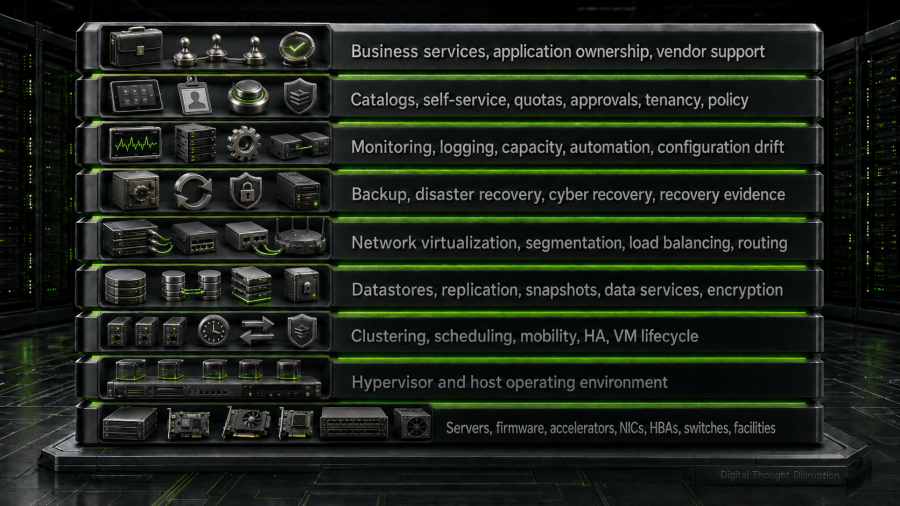
Replacing ESX addresses one layer. Replacing VMware successfully requires an answer for the entire stack.
This is why two platforms with similar VM features can produce very different enterprise outcomes. One may include integrated lifecycle, storage, networking, observability, and self-service. Another may provide a strong hypervisor while expecting the customer to assemble the rest. A third may use Kubernetes APIs and GitOps rather than a traditional virtualization operating model. A fourth may move responsibility into public-cloud services and financial governance.
The platform boundary is the first decision criterion. Do not compare products until the organization has defined what it expects the product to replace.
Why Enterprises Are Reconsidering VMware in 2026
The strongest business case for an assessment is not anger at a vendor. It is uncertainty that is large enough to justify a structured decision.
Subscription, Packaging, and Cost Predictability
Community discussions frequently describe substantial renewal increases, minimum commitments, bundle concerns, and uncertainty about future commercial terms [29], [30]. Those experiences should be treated as signals to validate an organization’s own contract, not as a substitute for that validation.
The defensible approach is to model the actual renewal proposal, required cores, included capabilities, support level, growth assumptions, and five-year sensitivity. A percentage increase from another customer is not a usable planning input. Your signed terms, workload demand, and risk tolerance are.
Platform Scope and Operational Fit
Some enterprises need a full private-cloud platform. Others need reliable VM hosting with mature backup and basic automation. Paying for a broad platform without adopting its operating model creates shelfware. Replacing a broad platform with a narrow hypervisor creates integration debt.
The assessment should determine whether the organization truly needs fleet operations, application catalogs, Kubernetes services, software-defined networking, integrated observability, policy-driven automation, and cyber-recovery workflows. The answer may differ by environment.
Concentration and Exit Risk
A platform can be technically excellent while creating strategic concentration. If compute, storage, network virtualization, automation, observability, recovery, and support are all coupled to one commercial stack, the next exit may be harder than the current one.
Exit risk is not a reason to reject integration. Integrated platforms often reduce daily operational cost. It is a reason to price reversibility, exportability, data mobility, skills portability, and contract flexibility as explicit decision criteria.
Hardware Refresh and Architecture Debt
A hardware refresh creates a natural decision window. It may be cheaper and safer to introduce a new platform on new hardware than to convert an existing estate in place. Broadcom’s own community guidance distinguishes a licensing-key question from a technical VCF conversion or import, which has prerequisites and supported scenarios [31].
The same principle applies to every destination. Storage, NICs, HBAs, firmware, GPU support, cluster topology, and network architecture can make a nominally simple hypervisor migration into a hardware and application transformation.
Application Modernization
A VMware assessment should not assume that every VM remains a VM. Some workloads should be retired, replaced with software as a service, replatformed to managed databases, refactored to containers, or moved to bare metal. Cloud migration frameworks explicitly include retain and retire alongside rehost and refactor [24].
A one-for-one VM relocation program can reduce immediate risk, but it can also preserve the same application and operating-model debt on a different hypervisor.
Scope, Assumptions, and Decision Principles
The weighted matrix later in this article uses a reference enterprise, not a universal customer profile.
The reference environment has:
- Approximately 1,000 mixed Windows and Linux VMs.
- Two core data centers plus remote or edge locations.
- An experienced VMware operations team.
- Mature external storage and network segmentation.
- A 24×7 production-support requirement.
- Regulated workloads and formal recovery obligations.
- Moderate public-cloud adoption.
- A five-year planning horizon.
- A preference for reducing risk without freezing modernization.
Scores use a five-point scale:
- 5: Strong fit with mature, integrated capabilities for the scenario.
- 4: Good fit with manageable dependencies or tradeoffs.
- 3: Conditional fit that requires material design or operational work.
- 2: Weak fit for broad use, but potentially valuable for selected workloads.
- 1: Poor fit for the reference scenario.
The matrix is a decision aid, not a product ranking. A hospital, retailer, university, manufacturer, software company, or small regional business would use different weights and may produce a different result.
Three principles govern the analysis:
- Application support is a gate, not a preference. A platform that is not supported by the application vendor cannot receive a high production score because its hypervisor features look attractive.
- Migration cost is part of platform cost. Labor, remediation, dual running, testing, and recovery redesign belong in the five-year model.
- The portfolio should be segmented. The organization should not force every workload onto one target unless standardization benefits clearly exceed workload-specific risk.
The Options Represent Different Operating Models
The following table summarizes what each option actually is.
| Platform or destination | Operating model | Strongest fit | Primary constraint |
|---|---|---|---|
| VMware Cloud Foundation 9.1 | Integrated private cloud with fleet, instance, domain, operations, automation, networking, storage, Kubernetes, and recovery services | Enterprises with significant VMware dependencies and mature private-cloud operations | Commercial concentration, platform overhead, and exit complexity |
| Nutanix AHV | Integrated HCI and private-cloud platform centered on NCI, AHV, AOS, Prism, and optional NCM and Flow services | Organizations seeking a cohesive private-cloud alternative with simplified infrastructure operations | Storage and ecosystem transition, application certification, and migration scope |
| Azure Local | Microsoft distributed infrastructure with Azure Arc as a unifying control plane | Microsoft and Azure-aligned enterprises, distributed sites, edge, and sovereignty scenarios | Azure control-plane dependencies, prescriptive hardware and lifecycle, and operational change |
| Windows Server 2025 Hyper-V | Hypervisor role plus failover clustering, storage, networking, Windows Admin Center, PowerShell, System Center, and optional Azure Arc | Windows-centric organizations that can assemble and own the full stack | Integration burden and less opinionated private-cloud experience |
| Red Hat OpenShift Virtualization | Kubernetes platform that runs VMs and containers through Kubernetes APIs and operators | Organizations modernizing applications while retaining selected VMs | Kubernetes skills, storage and network design, and application support validation |
| Proxmox VE 9.2 | Open virtualization platform using KVM and LXC with integrated cluster, storage, networking, backup, and management options | Cost-sensitive enterprises with strong Linux, automation, and integration capabilities | Vendor ecosystem depth, support model, certification, and enterprise operating maturity |
| Public cloud | Consumption platform spanning IaaS, PaaS, SaaS, and managed services | Workloads that benefit from elasticity, managed services, global reach, or rapid modernization | Cost governance, data gravity, egress, platform dependency, and application redesign |
| Kubernetes-native platform | Container application platform with declarative APIs, orchestration, and ecosystem services | Cloud-native applications and platform engineering | It is not a general destination for unmodified VM estates |
| Bare metal | Direct operating-system deployment on physical infrastructure | Specialized databases, appliances, HPC, latency-sensitive, or licensing-sensitive workloads | Reduced consolidation, manual lifecycle burden, and application-specific recovery design |
VMware Cloud Foundation 9.1 as the Stay-and-Modernize Option
VMware Cloud Foundation 9.1 is not simply the decision to do nothing. It is the decision to adopt or continue a broad private-cloud operating model.
VCF 9.1 combines the ESX and vCenter foundation with workload domains, NSX, storage options, VCF Operations, VCF Automation, Kubernetes services, fleet-level capabilities, lifecycle management, and protection and recovery functions [1]-[4]. Broadcom also documents supported paths to import existing vCenter environments, with or without NSX, as workload domains [3].
Where VCF 9.1 Is Strong
VCF is strongest when the enterprise already depends on mature VMware behavior and integrations:
- Application vendors certify VMware as the primary or only supported virtualization platform.
- NSX provides distributed firewalling, overlays, routing, load balancing, or tenant isolation that would require a separate redesign elsewhere.
- Backup, replication, recovery, monitoring, and automation tooling is deeply integrated with vSphere APIs.
- The team has established operational runbooks, escalation paths, and lifecycle skills.
- Workloads require specialized virtual hardware, mobility, performance, or recovery behavior that has not been proven on a target platform.
- The organization wants VMs, Kubernetes, self-service, operations, and private-cloud governance under one platform boundary.
The highest-value benefit may be avoided transformation risk. Remaining on VCF can preserve application support, reduce migration downtime, and prevent several years of parallel-platform operations.
Where VCF 9.1 Becomes Expensive
The cost is broader than subscription pricing. VCF requires management infrastructure, network and storage design, lifecycle discipline, observability, skills, governance, capacity reserves, and support processes. An organization that only needs basic VM hosting may be operating more platform than it consumes.
VCF also concentrates future exit risk. The more an enterprise adopts platform-specific automation, networking, recovery, and consumption patterns, the more work a later transition may require.
The Decision Test
Stay on VCF when the value of continuity, support, integration, and reduced migration risk exceeds the combined cost of the platform and its future concentration risk.
Do not stay merely because migration is uncomfortable. Do not leave merely because a competing hypervisor has a lower license line item.
Nutanix AHV as an Integrated Private-Cloud Alternative
Nutanix AHV is not a standalone hypervisor in the same sense as a narrowly deployed Hyper-V role. AHV is integrated into Nutanix Cloud Infrastructure and managed through Prism, with AOS providing distributed storage. Nutanix also offers Flow Virtual Networking, Nutanix Cloud Manager Self-Service, Nutanix Disaster Recovery, and Nutanix Move [5]-[9].
Where Nutanix Is Strong
Nutanix is attractive when the enterprise wants an integrated HCI model without recreating every VMware component independently.
Common strengths include:
- Unified management of compute, storage, and cluster operations through Prism.
- An opinionated lifecycle and support model.
- A migration tool that can pre-seed data, map networks, test workloads, perform final synchronization, and automate cutover [6].
- Optional self-service and orchestration through NCM Self-Service, formerly Calm [7].
- VPC-style virtual networking and segmentation through Flow Virtual Networking [8].
- Integrated protection and disaster-recovery services, subject to design and licensing [9].
For many enterprises, Nutanix is the closest operational substitute for an integrated VMware private-cloud environment, especially when the desired destination is still primarily a VM platform.
Where Nutanix Requires Care
Nutanix is not VMware with different branding.
The storage architecture changes. HCI resource balancing changes. Operational troubleshooting changes. Network virtualization and security constructs differ from NSX. Backup and recovery products must be validated for AHV feature depth, restore behavior, application consistency, immutability, and cyber-recovery workflows.
Nutanix supports external-storage configurations in selected architectures, but that does not mean every existing Fibre Channel or IP SAN design can be preserved without redesign. Hardware, storage, and application support must be tested against the exact target configuration.
The Decision Test
Choose Nutanix when the organization wants a cohesive private-cloud platform, accepts the HCI and operating-model transition, and can validate application and ecosystem support before migration.
It is a poor decision when the business assumes Nutanix Move eliminates application testing or when the architecture team treats Flow as a drop-in NSX configuration conversion.
Azure Local as Azure-Controlled Distributed Infrastructure
Azure Local is Microsoft’s distributed infrastructure platform for customer-owned locations. Azure Arc is the unifying control plane, and Azure management tooling is used to provision, govern, and operate Azure Local resources [10].
This is a different proposition from installing Hyper-V on Windows Server.
Azure Local VMs enabled by Azure Arc use Azure resource constructs and can be managed through the Azure portal, command-line tools, templates, and infrastructure-as-code workflows. Arc resource bridge is a critical management component. Microsoft supports connected and disconnected operating patterns, but the exact dependency, lifecycle, and recovery model must be designed rather than assumed [10].
Where Azure Local Is Strong
Azure Local is compelling when:
- The organization already uses Azure identity, policy, monitoring, security, and resource-management practices.
- Workloads must remain on-premises for latency, sovereignty, resilience, or operational reasons.
- The enterprise has many branch, edge, or distributed locations.
- Application teams benefit from Azure-style resource provisioning and governance.
- Microsoft support, Windows licensing, and Azure commercial relationships are already strategic.
- The target operating model deliberately includes Azure Arc, Azure Resource Manager, and cloud-connected lifecycle services.
Microsoft’s Azure Migrate based VMware migration path for Azure Local is generally available for supported environments. It uses source and target appliances, replication, Azure projects, network mappings, and explicit target prerequisites [11], [12]. That makes Azure Local more viable as a first-party VMware migration destination than it was in earlier releases.
Azure Local storage options have also evolved. Current Microsoft documentation includes generally available external SAN integration alongside Storage Spaces Direct, with supported configurations and vendor requirements that must be verified against the current release [13]. This invalidates the older blanket claim that Azure Local cannot use external SAN storage, but it does not make every existing SAN design portable.
Where Azure Local Requires Care
Azure Local introduces a new control-plane dependency and resource model. The team must understand:
- Arc resource bridge availability and recovery.
- Azure tenant, subscription, role, policy, and resource-provider dependencies.
- Required outbound connectivity or disconnected-operation design.
- Azure Local release cadence and supported update windows.
- Azure Local VM types and the distinction between Arc-enabled lifecycle management and unmanaged VMs.
- Supported hardware catalog and firmware integration.
- Storage and SDN support boundaries.
- Billing, registration, and cloud-service consumption.
The Decision Test
Choose Azure Local when Azure is the intended hybrid control plane, not merely because Hyper-V is familiar.
Avoid it when the organization wants an entirely independent on-premises platform, lacks Azure governance maturity, or is unwilling to operate Arc resource bridge and Azure dependencies as production control-plane components.
Windows Server 2025 Hyper-V as a Composable Microsoft Platform
Hyper-V is not dead. Microsoft documents Hyper-V as a server role across Windows Server 2025 editions [15].
The more important question is what surrounds it.
A production Hyper-V platform may combine Windows Server Failover Clustering, Cluster Shared Volumes, SAN or Storage Spaces Direct, SMB storage, Network ATC, software-defined networking, Windows Admin Center, PowerShell, System Center Virtual Machine Manager, Azure Arc, backup software, monitoring, and disaster-recovery tooling. System Center VMM can manage compute, storage, networking, libraries, templates, private-cloud constructs, and Arc-enabled self-service, but it is a separate platform decision [16].
Where Hyper-V Is Strong
Hyper-V is attractive when:
- Windows Server Datacenter licensing already aligns with the workload estate.
- The organization has strong Windows, clustering, PowerShell, Active Directory, storage, and System Center skills.
- Existing SAN investments should remain in service.
- The enterprise wants flexibility to build a platform rather than adopt a prescriptive HCI appliance model.
- VM requirements are conventional and do not depend heavily on NSX or VMware-specific integrations.
- Third-party backup, monitoring, and automation products provide the required support.
Where Hyper-V Requires Care
Hyper-V’s flexibility can become architectural fragmentation. Every decision that an integrated platform makes for the operator must be assigned to an owner:
- Who owns host imaging and firmware?
- Who validates cluster networking and quorum?
- Who provides self-service and approval workflows?
- Who manages virtual networking and segmentation?
- Who owns templates, images, and configuration drift?
- Who integrates monitoring, backup, cyber recovery, and service management?
- Who provides 24×7 support across Microsoft and third-party components?
The risk is not that Hyper-V lacks a feature. The risk is that the organization underestimates the work required to assemble features into a dependable service.
The Decision Test
Choose Windows Server 2025 Hyper-V when the enterprise wants a Microsoft-centric, flexible virtualization foundation and has the engineering maturity to integrate and operate the surrounding platform.
Do not describe the decision as “Hyper-V is included, so the platform is free.” The hypervisor role may be commercially favorable, but the operating model still has a cost.
Red Hat OpenShift Virtualization as a Kubernetes-First VM Platform
OpenShift Virtualization allows VMs and containers to run within an OpenShift Container Platform cluster. It uses Kubernetes custom resources and controllers to manage VM workloads rather than reproducing a vCenter-centered operating model [17].
Current Red Hat documentation for OpenShift Container Platform 4.22 and Migration Toolkit for Virtualization 2.12 provides a current basis for planning and executing migrations from VMware vSphere [17]-[19].
Where OpenShift Virtualization Is Strong
OpenShift Virtualization is compelling when:
- The enterprise wants a common Kubernetes API and governance model for VMs and containers.
- Application teams already use OpenShift, GitOps, operators, pipelines, namespaces, quotas, and policy.
- VMs are transitional components in a broader modernization roadmap.
- Platform engineering, not traditional virtualization administration, is the desired operating model.
- The organization values declarative automation and application-centric workflows.
- Selected applications can be modernized incrementally while dependent VMs remain adjacent.
Where OpenShift Virtualization Requires Care
Kubernetes does not eliminate infrastructure operations. It moves and changes them.
The target requires deliberate choices for:
- Container Storage Interface implementations and VM disk behavior.
- Container Network Interface design, secondary networks, segmentation, and load balancing.
- Cluster topology, control-plane availability, worker placement, and maintenance.
- VM backup, application consistency, disaster recovery, and cyber recovery.
- Guest operating systems, drivers, vendor certification, and virtual hardware.
- Namespace tenancy, quotas, privileged access, and platform security.
- Kubernetes and OpenShift lifecycle skills.
A migration toolkit can move disks and configuration. It cannot prove that a commercial application vendor supports the new platform or that the operations team can meet the same recovery objective.
The Decision Test
Choose OpenShift Virtualization for workload segments where the organization genuinely wants a Kubernetes operating model and can use VM support as a modernization bridge.
Do not select it as an estate-wide vSphere replacement solely because it can boot virtual machines.
Proxmox VE 9.2 as Open Virtualization with an Integration Burden
Proxmox VE combines KVM virtual machines, LXC containers, cluster management, high availability, software-defined storage, software-defined networking, and integrated management. As of the research baseline for this article, the current release set includes Proxmox VE 9.2, Proxmox Backup Server 4.2, and Proxmox Datacenter Manager 1.1 [20], [21].
Proxmox is often dismissed as either a homelab tool or presented as an effortless enterprise replacement. Both descriptions are too shallow.
Where Proxmox Is Strong
Proxmox can be a strong production platform when the organization values:
- Open-source software and transparent platform mechanics.
- KVM and Linux operational skills.
- Flexible storage choices, including Ceph, ZFS, shared storage, and external integrations.
- Practical APIs and automation.
- Lower recurring software cost.
- Proxmox Backup Server integration.
- Reduced dependency on one proprietary virtualization stack.
- The ability to build targeted clusters without purchasing a full private-cloud suite.
Proxmox includes an ESXi import wizard. The administration documentation notes that the wizard was introduced in Proxmox VE 8.2 and can migrate guests from VMware ESXi [23]. The current product line remains relevant for migration assessments, but direct import has constraints. For example, documentation notes that guests on vSAN storage require an intermediate step rather than direct import.
Where Proxmox Requires Care
Enterprises must validate more than whether a VM boots:
- Application and appliance vendor support.
- Backup and recovery integration beyond native tools.
- Cyber-recovery architecture and isolated recovery testing.
- Centralized multi-cluster operations through Proxmox Datacenter Manager.
- Monitoring, event management, capacity planning, and service-management integration.
- Network virtualization and security requirements.
- Hardware certification and support ownership.
- Availability of experienced operators and partners.
- Escalation coverage for severity-one incidents.
Proxmox’s direct enterprise support is documented around Austrian business days for subscription customers, with resellers available for other time zones and local support [22]. An enterprise requiring 24×7 coverage should obtain a written support design that identifies who owns first response, product escalation, hardware support, and recovery leadership.
The Decision Test
Choose Proxmox when the organization has strong Linux and infrastructure engineering, can validate workload support, and is willing to own integration rather than assume a broad ecosystem will supply it automatically.
Do not reject it because it is open source. Do not select it because the license line is low.
Public Cloud as a Workload Transformation Destination
Public cloud is not another row in a hypervisor comparison. It changes the consumption model, financial model, security boundary, network model, recovery model, and division of responsibility.
A public-cloud strategy may use infrastructure as a service for selected VMs, but it should also consider managed databases, container platforms, serverless services, software as a service, object storage, identity services, and application refactoring. AWS’s migration guidance explicitly includes retain, retire, rehost, relocate, repurchase, replatform, and refactor [24]. Microsoft’s Cloud Adoption Framework similarly connects cloud investment to business objectives, guardrails, resilience, security, cost efficiency, and operating-model readiness [25].
Where Public Cloud Is Strong
Public cloud is attractive when workloads need:
- Elastic or highly variable capacity.
- Rapid regional deployment.
- Managed data, analytics, AI, messaging, or integration services.
- Global access and content delivery.
- Faster experimentation and product delivery.
- A path away from infrastructure ownership.
- Disaster-recovery capacity without a second owned data center.
Where Public Cloud Requires Care
A VM rehost can preserve technical debt while adding cloud cost. The enterprise must model:
- Committed-use assumptions and utilization.
- Network connectivity, latency, and egress.
- Storage performance and transaction charges.
- Managed-service premiums.
- Backup, cross-region recovery, and cyber recovery.
- Identity, keys, secrets, and privileged access.
- Monitoring and incident ownership.
- FinOps, tagging, budgets, and cost allocation.
- Platform-specific services and future exit.
The Decision Test
Choose public cloud by workload outcome. Use it where cloud services, elasticity, location, or delivery speed create measurable value.
Do not move an entire VMware estate to cloud VMs merely to avoid a private-cloud renewal unless the five-year model includes utilization, operations, network, recovery, and exit.
Bare metal and Kubernetes-native platforms are often included in VMware replacement discussions as if they are low-cost endpoints. In practice, they are specialized operating models.
Bare Metal
Bare metal can be the right answer for:
- Databases or appliances with explicit physical-server support.
- High-performance computing and tightly coupled workloads.
- Very large memory or accelerator configurations.
- Applications where per-core licensing or virtualization overhead changes economics.
- Latency-sensitive systems with a stable deployment pattern.
- Platforms that already include their own clustering and recovery.
The tradeoff is reduced consolidation and a larger hardware-lifecycle responsibility. Provisioning, patching, configuration, monitoring, recovery, spare capacity, and replacement must still be automated and governed.
Kubernetes-Native Platforms
A production Kubernetes platform requires highly available control planes, worker capacity, secure access, networking, storage, lifecycle management, policy, monitoring, and recovery [26]. KubeVirt can add VM workloads to Kubernetes [27]. Metal3 can expose bare-metal lifecycle through Kubernetes APIs [28].
Those technologies are valuable, but they do not make infrastructure responsibility disappear. They are best suited to organizations that want declarative infrastructure and application platforms, have platform-engineering skills, and can operate the resulting ecosystem.
The Decision Test
Use bare metal or Kubernetes-native destinations where their operating model matches the workload. Do not use them as default parking places for VMs that have not been assessed.
The Segmented Target Architecture
The strongest enterprise outcome is usually a portfolio, not a winner.
The architecture team should define a placement policy that maps workloads to several approved destinations while preserving shared governance. The diagram below shows the model.
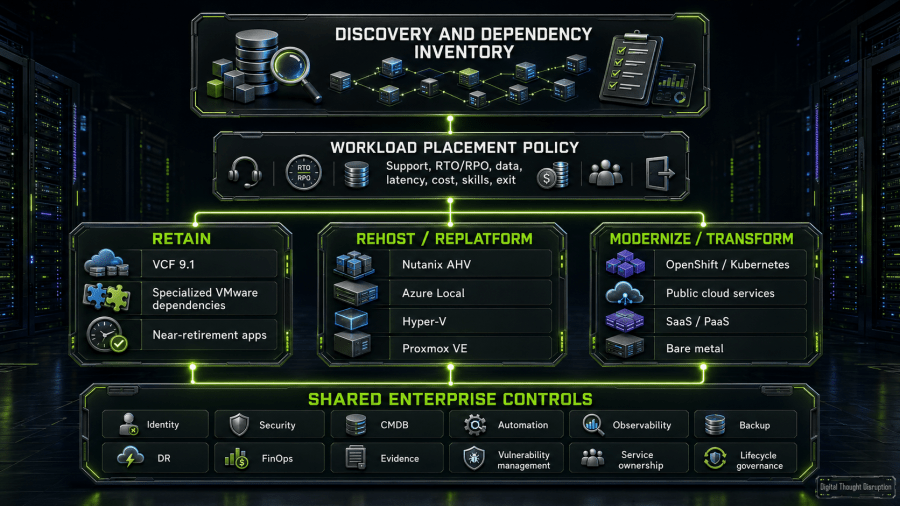
The shared-control layer does not require one universal management product. It requires common policy, ownership, evidence, and integration standards across platforms.
A segmented architecture can intentionally use:
- VCF for vendor-sensitive, NSX-dependent, or high-risk legacy workloads.
- Nutanix for a large general-purpose private-cloud VM segment.
- Azure Local for Microsoft-aligned core, branch, or edge workloads.
- Hyper-V for conventional Windows workloads where the organization can assemble the stack.
- Proxmox for cost-sensitive, Linux-heavy, internal, lab, edge, or selected production services with validated support.
- OpenShift Virtualization for VMs adjacent to container modernization.
- Public cloud for applications that benefit from managed services or elasticity.
- Bare metal for specialized performance, appliance, or licensing cases.
This model limits the blast radius of any one commercial or technical decision. It also creates a new obligation: the enterprise must become good at portfolio governance rather than relying on one platform to hide every difference.
Decision Criteria That Matter More Than Feature Parity
A strong decision framework turns broad preferences into testable evidence.
Application and Vendor Support
For every workload, obtain an explicit answer to these questions:
- Is the operating system supported on the target platform and virtual hardware?
- Does the application vendor certify the hypervisor, Kubernetes platform, cloud service, or bare-metal configuration?
- Does support require specific drivers, firmware, virtual devices, storage protocols, or cluster settings?
- Are third-party appliances licensed or supported by host, socket, core, VM, or platform?
- Will the vendor accept a severity-one case without requiring reproduction on VMware?
- Are backup, security, monitoring, and management agents supported?
A successful test migration is not equivalent to a supported production configuration.
Storage and Data Services
Storage portability is often more difficult than VM conversion.
Assess:
- Existing SAN, NAS, vSAN, HCI, local storage, and object-storage dependencies.
- Capacity, latency, IOPS, throughput, queue depth, and burst behavior.
- Snapshot and clone semantics.
- Replication, consistency groups, stretched clusters, and metro behavior.
- Encryption, key management, immutability, retention, and secure deletion.
- Raw devices, shared disks, persistent reservations, multipathing, and guest clustering.
- Migration bandwidth and data-seeding windows.
- Storage licensing and future expansion units.
The right target is not the one that can attach a disk. It is the one that can meet the service’s data behavior and recovery requirements.
SDN, Segmentation, and Network Services
NSX-dependent estates need a dedicated translation workstream.
Inventory:
- Distributed firewall rules and security groups.
- Overlay segments, VLANs, VPCs, logical switches, and virtual networks.
- Tiered routing, gateways, BGP, NAT, VPN, load balancing, and service insertion.
- IP address management, DNS, DHCP, and multiple-NIC patterns.
- Network observability, flow logs, packet capture, and troubleshooting tools.
- Tenant isolation and overlapping address spaces.
- Edge-site and disconnected networking.
- Policy ownership and change approval.
Do not convert an NSX rule count into a target-platform feature checkbox. Determine which rules are still required, which can move to host or network controls, and which should be redesigned around application identity.
Automation and Self-Service
Compare the complete consumption path:
- Catalog or API request.
- Approval and entitlement.
- Quota and placement.
- Image and template lifecycle.
- Compute, storage, network, identity, and security provisioning.
- Configuration management and secrets.
- CMDB and IT service management updates.
- Day-two actions.
- Cost allocation and expiration.
- Decommissioning and evidence retention.
A REST API is not a self-service platform. A portal is not automation unless it produces repeatable, governed outcomes.
Backup, Disaster Recovery, and Cyber Recovery
Backup support must be validated per platform and per workload.
The assessment should prove:
- Application-consistent backup and restore.
- Granular and full-VM recovery.
- Immutable or isolated copies.
- Recovery from credential compromise and platform compromise.
- Cross-site or cross-region orchestration.
- Network and identity recovery.
- Management-plane backup and restore.
- Recovery of encryption keys, certificates, DNS, and dependencies.
- RTO and RPO under realistic concurrency.
- Clean-room validation and evidence retention.
A migration that preserves production but weakens recovery is not a successful migration.
Migration Tooling and Downtime
Migration tooling should be assessed as a pipeline:
- Discovery and eligibility checks.
- Dependency mapping.
- Source snapshot or changed-block tracking.
- Initial replication.
- Delta synchronization.
- Guest conversion and driver handling.
- Network mapping and IP changes.
- Test migration in an isolated network.
- Application validation.
- Final cutover and rollback.
- Post-cutover agent, backup, monitoring, and registration tasks.
The best migration tool is the one that exposes exceptions early. A tool that reports “success” after disk conversion but before application acceptance can create false confidence.
Skills, Staffing, and Operational Maturity
Platform decisions are labor decisions.
Assess:
- Existing administrator and engineer skills.
- Availability of architects, partners, and support engineers.
- 24×7 escalation and incident-command coverage.
- Ability to operate storage, network, automation, backup, and security integrations.
- Training time and attrition risk.
- Documentation and runbook maturity.
- Ability to patch and upgrade without vendor professional services.
- Capacity to run two or more platforms during transition.
- Ownership of the new platform after the migration project ends.
The organization should not select a platform that only the migration partner knows how to operate.
Weighted Platform Decision Matrix
The reference matrix uses ten criteria totaling 100 points.
| Criterion | Weight |
|---|---|
| Application and vendor support | 15 |
| Resilience, disaster recovery, and cyber recovery | 15 |
| Storage fit | 10 |
| Network and segmentation fit | 10 |
| Automation and self-service | 10 |
| Migration complexity and downtime | 10 |
| Skills and support ecosystem | 10 |
| Five-year cost predictability | 10 |
| Exit and reversibility | 5 |
| Modernization path | 5 |
| Total | 100 |
The next table groups those criteria for readability. Each cell is the weighted contribution, not a raw one-to-five score.
| Platform | App support /15 | Protection /15 | Infrastructure /20 | Operations /30 | Economics and exit /15 | Modernization /5 | Total /100 |
|---|---|---|---|---|---|---|---|
| VMware Cloud Foundation 9.1 | 15 | 15 | 20 | 30 | 6 | 4 | 90 |
| Nutanix AHV | 12 | 12 | 16 | 24 | 9 | 4 | 77 |
| Public cloud | 12 | 15 | 16 | 22 | 6 | 5 | 76 |
| Azure Local | 12 | 12 | 14 | 24 | 9 | 4 | 75 |
| Windows Server 2025 Hyper-V | 12 | 12 | 16 | 20 | 12 | 2 | 74 |
| Proxmox VE 9.2 | 9 | 9 | 14 | 20 | 15 | 2 | 69 |
| OpenShift Virtualization 4.22 | 9 | 9 | 14 | 20 | 10 | 5 | 67 |
| Kubernetes-native platform | 6 | 9 | 14 | 16 | 11 | 5 | 61 |
| Bare metal | 12 | 6 | 16 | 12 | 11 | 2 | 59 |
How to Interpret the Result
VCF scores highest because the reference enterprise already has VMware skills, integrations, support patterns, and workloads. Staying avoids the largest migration, certification, and downtime risks. Its score is reduced by cost predictability and exit concentration.
Nutanix produces the strongest balanced private-cloud alternative score. It preserves an integrated infrastructure model while requiring a meaningful storage, ecosystem, and operating transition.
Public cloud scores well because it offers mature resilience and modernization options, but its economics and exit score is deliberately low for a broad rehost of steady-state enterprise VMs.
Azure Local and Hyper-V score similarly for different reasons. Azure Local provides a more integrated Azure hybrid operating model. Hyper-V offers greater composability and storage flexibility but requires more assembly.
Proxmox scores strongly on economics and reversibility, but lower on application certification, enterprise protection integration, and support maturity for the reference scenario.
OpenShift Virtualization scores lower as an estate-wide rehost target and higher as a modernization platform. That is exactly why total scores should not be used without workload segmentation.
Bare metal and Kubernetes-native platforms rank lower for the complete VM estate, but they can be the highest-scoring destinations for specific workload classes.
Reweight by Workload Segment
A single enterprise should run the matrix several times:
- Vendor-sensitive applications: Increase application support and recovery weights.
- Edge and branch workloads: Increase disconnected operations, hardware footprint, and remote lifecycle weights.
- Developer platforms: Increase automation, API, tenancy, and modernization weights.
- Regulated workloads: Increase evidence, security, data location, and cyber-recovery weights.
- Cost-sensitive internal services: Increase five-year cost, supportability, and exit weights.
- High-performance workloads: Increase hardware, accelerator, latency, and bare-metal fit weights.
The portfolio decision emerges from those segment-specific results.
Five-Year TCO, Migration Cost, and Exit Risk
A credible TCO model must compare equivalent service scope.
A low-cost hypervisor plus separate storage, backup, monitoring, automation, support, and engineering cannot be compared directly with an integrated private-cloud subscription. Public cloud list pricing cannot be compared with an on-premises host cost without utilization, network, operations, resilience, and commitment assumptions.
Use the following cost categories.
| Cost category | What to include |
|---|---|
| Platform subscription and support | Hypervisor, management, HCI, SDN, automation, operations, Kubernetes, support tiers, and required add-ons |
| Hardware and facilities | Servers, accelerators, NICs, HBAs, switches, racks, power, cooling, spares, warranties, and refresh cycles |
| Storage and data services | Capacity, performance tiers, replication, snapshots, object or file services, external arrays, and expansion |
| Network and security | Switching, routing, firewalls, overlays, microsegmentation, load balancing, IPAM, DNS, and connectivity |
| Protection and recovery | Backup, immutable storage, DR infrastructure, orchestration, cyber recovery, testing, and evidence |
| Management and automation | Monitoring, logging, capacity, CMDB, ITSM, configuration, self-service, pipelines, and secrets |
| Migration factory | Discovery, tools, appliances, remediation, testing, application-owner labor, cutover, and rollback |
| Dual-platform operation | Parallel licensing, hardware, support, staff, monitoring, backup, and recovery during transition |
| Skills and staffing | Training, hiring, partner services, on-call coverage, documentation, and productivity loss |
| Cloud consumption | Compute, storage, managed services, data transfer, support, commitments, and FinOps operations |
| Risk allowance | Outage exposure, failed migrations, schedule slippage, vendor gaps, and temporary capacity |
| Exit reserve | Data export, contract termination, workload portability, future migration tools, and decommissioning |
| Avoided costs and residual value | Retired contracts, deferred refresh, reused hardware, reduced facilities, and decommissioned tools |
A practical model is:
Five-year TCO = initial platform cost + recurring cost + migration and transition cost + operating cost + risk allowance + exit reserve – avoided cost – residual value
The Cost Categories Most Often Missed
Dual running is frequently the largest hidden transition cost. Migrations take longer than the technical conversion schedule because application owners, blackout windows, remediation, and recovery validation control the pace.
Application remediation includes drivers, boot configuration, agents, static IP handling, licensing, clustering, backup changes, monitoring, and vendor acceptance.
Operational duplication appears when two or more platforms require separate dashboards, patch processes, skill sets, support contracts, image pipelines, and recovery runbooks.
Exit reserve prevents the new platform from becoming the next unpriced lock-in. The organization should identify how data, images, configurations, policies, and automation can be exported before signing a long-term agreement.
Model at Least Three Scenarios
- Stay and optimize: Renew VCF, consolidate clusters, retire unused workloads, modernize selectively, and reduce shelfware.
- Primary-platform migration: Move most workloads to one alternative, with a small VMware retention island.
- Segmented portfolio: Use multiple approved destinations based on workload fit.
The segmented model may have higher management complexity but lower workload risk and concentration. The single-platform model may reduce steady-state complexity but increase migration and dependency risk. The correct result depends on the organization’s scale, standardization discipline, and ability to operate a platform portfolio.
Workloads That May Need to Remain on VMware
A rational VMware exit plan should include an approved retention category.
Workloads may need to remain when they have:
- Vendor support limited to VMware or a narrow certified configuration.
- Commercial virtual appliances with VMware-specific deployment and lifecycle tooling.
- Dependence on NSX distributed firewalling, overlays, service insertion, or recovery networking that has not been redesigned.
- Specialized virtual hardware, passthrough, GPU, SR-IOV, shared-disk, raw-device, or guest-clustering requirements.
- Recovery workflows tied to current replication, backup, or orchestration products.
- Very large data sets whose movement risk exceeds near-term savings.
- A short remaining life that does not justify remediation.
- High business criticality and no proven target-platform operating history.
- Licensing or hardware constraints that produce worse economics elsewhere.
- An application owner who cannot validate the target before the required exit date.
Retention should not mean neglect.
Every retained workload should have:
- A named business owner.
- A documented support position.
- A lifecycle and security plan.
- A recovery plan with tested evidence.
- A cost allocation.
- A reason for retention.
- A review date.
- A future trigger for migration, retirement, or replacement.
A controlled VMware island is a valid architecture. An accidental VMware island with no lifecycle funding is technical debt.
Practical Discovery and Assessment Checklist
The assessment should produce evidence that is detailed enough to drive platform scoring and migration waves.
Business, Contract, and Governance
- Identify the executive sponsor and accountable platform owner.
- Obtain current VMware contracts, renewal proposals, support terms, and entitlements.
- Record hardware lease, warranty, and refresh dates.
- Define the business outcomes expected from the assessment.
- Define decision criteria and weights before vendor demonstrations.
- Establish risk-acceptance and exception authorities.
- Define the five-year baseline date, currency, and growth assumptions.
- Identify data sovereignty, regulatory, audit, and evidence requirements.
- Define the maximum acceptable dual-run period.
- Establish a workload-retention policy and review cadence.
Inventory and Dependency Discovery
- Export VM, host, cluster, datastore, network, tag, folder, and resource-pool inventory.
- Capture CPU, memory, storage, network, and accelerator utilization over representative periods.
- Identify powered-off, orphaned, duplicate, and retirement-candidate workloads.
- Map application-to-VM and VM-to-service dependencies.
- Identify DNS, NTP, PKI, identity, secrets, licensing, and external-service dependencies.
- Record maintenance windows and business blackout periods.
- Classify workloads by criticality, RTO, RPO, and maximum tolerable downtime.
- Identify latency, data-gravity, sovereignty, and locality constraints.
- Record application owners and technical validators.
- Separate infrastructure appliances from business workloads.
Application and Operating-System Support
- Validate guest operating-system support on each candidate platform.
- Obtain written application-vendor support statements where material.
- Identify VMware Tools, virtual hardware, driver, and agent dependencies.
- Inventory virtual appliances and their supported deployment targets.
- Identify applications using shared disks, raw devices, passthrough, SR-IOV, GPUs, or USB devices.
- Confirm licensing behavior after changing hypervisor, core count, host count, or cloud location.
- Identify applications that should be retired, replaced, or modernized instead of rehosted.
- Define functional, performance, security, and recovery acceptance tests.
Compute and Hardware
- Validate target hardware compatibility and support contracts.
- Compare CPU generations, NUMA behavior, memory density, and overcommit assumptions.
- Validate NIC, HBA, accelerator, firmware, BIOS, and driver combinations.
- Size maintenance, failure, and evacuation capacity.
- Define cluster, rack, site, and power failure domains.
- Validate edge and remote-site footprint requirements.
- Determine whether existing hardware can be reused without creating unsupported configurations.
Storage and Data
- Inventory datastores, protocols, arrays, vSAN clusters, policies, and capacity tiers.
- Measure latency, IOPS, throughput, queue depth, and growth.
- Identify snapshot, clone, replication, deduplication, compression, and encryption dependencies.
- Validate target support for SAN, NAS, HCI, Ceph, local, object, and cloud storage as applicable.
- Identify shared-disk, persistent-reservation, guest-cluster, and multipathing requirements.
- Estimate seed, replication, and cutover bandwidth.
- Define data destruction and decommissioning evidence.
Network and Security
- Export distributed-switch, port-group, VLAN, overlay, route, gateway, NAT, VPN, and load-balancer configuration.
- Inventory NSX distributed firewall rules, groups, tags, and dynamic membership.
- Identify east-west and north-south inspection requirements.
- Map IP addresses, subnets, gateways, DNS, DHCP, and IPAM ownership.
- Identify overlapping address spaces and tenant boundaries.
- Define target segmentation, routing, load balancing, and service-insertion patterns.
- Validate packet capture, flow logging, and troubleshooting capabilities.
- Test firewall and network-policy translation rather than copying rules blindly.
Backup, Disaster Recovery, and Cyber Recovery
- Inventory backup products, policies, proxies, repositories, retention, and immutability.
- Validate target-platform application-consistent backup support.
- Validate granular, full-VM, bare-metal, and management-plane recovery.
- Map replication, recovery plans, network mappings, and failover dependencies.
- Test recovery at representative scale, not one VM at a time.
- Define clean-room and cyber-recovery procedures.
- Protect identity, DNS, PKI, keys, secrets, monitoring, and management systems.
- Record recovery evidence and application-owner acceptance.
Automation, Operations, and Service Management
- Inventory APIs, PowerCLI, scripts, orchestration, pipelines, and configuration-management integrations.
- Inventory catalogs, blueprints, templates, images, quotas, approvals, and tenancy.
- Map monitoring, logging, alerting, capacity, and event-management integrations.
- Identify CMDB, ITSM, asset, chargeback, and showback dependencies.
- Define target image and template lifecycle.
- Define patching, firmware, certificate, and secret-rotation processes.
- Define platform service levels, support hours, and escalation paths.
- Validate operational dashboards and alerts before production cutover.
Migration and Transition
- Test discovery and eligibility tools against representative workloads.
- Validate cold, warm, replication-based, backup-based, and rebuild migration patterns.
- Test driver conversion, boot mode, disk layout, and network configuration.
- Perform isolated test migrations with application-owner validation.
- Measure actual replication and cutover duration.
- Define rollback criteria and source-retention periods.
- Plan backup, monitoring, security, identity, and agent onboarding after cutover.
- Group migration waves by dependency and business service, not only by VM count.
- Define source decommissioning and license-reclamation evidence.
Skills, Support, and Economics
- Map current skills to each candidate operating model.
- Identify training, hiring, partner, and managed-service requirements.
- Obtain written support coverage for platform, hardware, storage, backup, and network components.
- Validate 24×7 severity-one escalation where required.
- Model five-year platform, transition, labor, cloud, facility, and risk costs.
- Include dual-run cost and productivity loss.
- Include future exit and data-export cost.
- Run sensitivity for growth, utilization, renewal, cloud consumption, and schedule delay.
- Confirm that the steady-state operations team accepts ownership before platform approval.
A Phased Evaluation and Migration Sequence
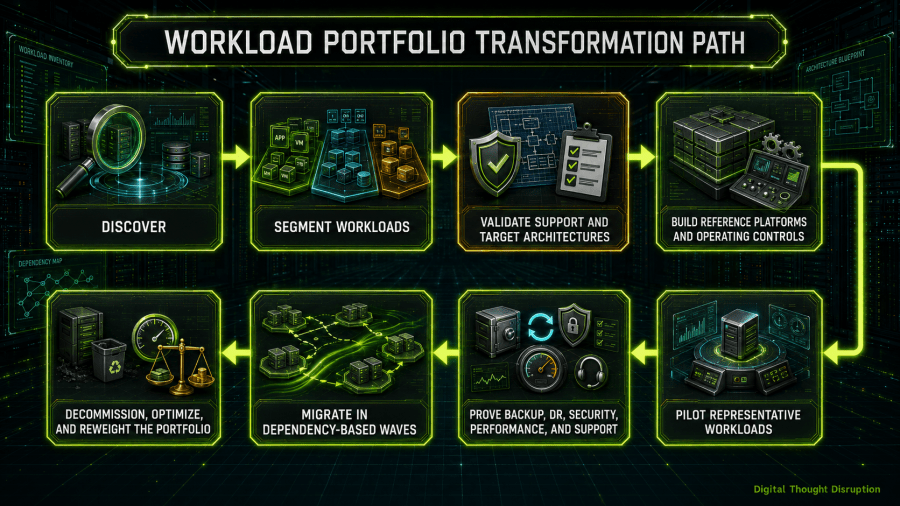
The program should be governed as a sequence of evidence gates.
Discovery Gate
Exit only when the team has a reliable inventory, dependency map, application owners, support constraints, utilization baseline, and initial cost model.
Architecture Gate
Exit only when each candidate has a documented compute, storage, network, security, automation, observability, backup, recovery, and lifecycle design.
Pilot Gate
Select workloads that expose real complexity:
- Windows and Linux.
- High and low I/O.
- Multiple network segments.
- Stateful and stateless applications.
- Backup and disaster-recovery requirements.
- Commercial vendor support.
- Automation and self-service.
- Edge or disconnected behavior where relevant.
A pilot composed only of simple utility VMs proves very little.
Production-Wave Gate
Require:
- Application-owner acceptance.
- Performance evidence.
- Backup and restore evidence.
- Recovery and rollback evidence.
- Monitoring and security onboarding.
- Service-desk and escalation readiness.
- Capacity and failure headroom.
- Change approval tied to a business service.
Decommission Gate
A migration wave is not financially complete until the source capacity, licenses, backups, monitoring, firewall rules, DNS records, documentation, and support obligations are retired or reassigned.
Common Failure Patterns
Choosing a Winner Before Discovering the Estate
Vendor demonstrations can create a preferred answer before the organization understands its dependencies. Define criteria and inventory first.
Treating License Savings as TCO
A lower subscription cost can be overwhelmed by migration labor, dual running, recovery redesign, new staff, and operational duplication.
Moving Every Workload to One Target
Standardization is valuable, but forced standardization can create unsupported applications, poor cloud economics, unnecessary Kubernetes complexity, or retained platform islands that were never budgeted.
Assuming a Migration Tool Proves Production Readiness
A tool proves that it can convert or replicate a workload under tested conditions. It does not prove application support, operational competence, cyber recovery, or performance at scale.
Rebuilding vSphere Poorly on a Different Stack
Selecting a flexible hypervisor and then assembling disconnected tools without clear ownership can produce a platform that is cheaper to license and more expensive to operate.
Treating Kubernetes as an Operations Shortcut
Kubernetes can improve automation and application consistency, but production clusters require strong platform engineering, storage, networking, security, observability, and lifecycle practices [26].
Ignoring the Retained VMware Island
A migration program that leaves ten percent of workloads on VMware may retain more than ten percent of the platform cost and operational burden. The retained segment needs explicit scope, licensing, lifecycle, and review triggers.
Failing to Price the Next Exit
Every selected platform should have an exit statement before adoption. Document image formats, data export, API portability, policy export, configuration repositories, contract termination, and target-independent backup.
Conclusion
The enterprise VMware decision in 2026 is not a contest to find one hypervisor with the longest feature list.
VMware Cloud Foundation 9.1 can remain the correct answer for workloads and organizations that need its application support, integrated private-cloud services, networking, lifecycle, recovery, and operational continuity. Nutanix AHV can provide a strong integrated alternative. Azure Local can align on-premises infrastructure with an Azure operating model. Windows Server 2025 Hyper-V can support a flexible Microsoft-centered platform. OpenShift Virtualization can unite VMs and containers for organizations that genuinely want Kubernetes operations. Proxmox VE can create strong economic and architectural options when support, certification, and integration are engineered deliberately. Public cloud, Kubernetes-native platforms, and bare metal can each be the best destination for selected workload classes.
The mistake is assuming that one answer must win every workload.
A defensible strategy begins with discovery, establishes weighted criteria, validates application and recovery support, models five-year cost and exit risk, and then segments the portfolio. Some workloads stay. Some rehost. Some replatform. Some modernize. Some retire.
The target architecture is not “VMware, but somewhere else.” It is an intentionally governed portfolio in which each workload runs on the platform that best matches its support, resilience, performance, operating, financial, and modernization requirements.