When importing an existing vCenter into VMware Cloud Foundation (VCF) 9.0.x to create a new VI Workload Domain, one of the less obvious prerequisites concerns the network placement of the vCenter Server VM itself.
A scenario I recently encountered was the following:
The existing vCenter was going to be imported into VCF 9.0.x.
The vCenter VM was hosted on the default cluster in the VCF Management Domain.
The VM was therefore managed by the Management vCenter.
However, the vCenter VM was connected to a custom/non-VM-Management Distributed Port Group rather than the port group used for VM Management.
At first glance, this looks perfectly valid from a vSphere perspective. The VM has network connectivity and the vCenter is fully operational. However, the VCF brownfield import validation has additional requirements.
The problem
During the Import vCenter workflow, the prechecks can fail with an error similar to:
The vCenter Server virtual machine is not connected to a distributed virtual port group or the dvpg has an association with non management traffic type…
Broadcom documents this behavior in KB 420920. The issue occurs because user-defined VM port groups are excluded from the SDDC Manager inventory during the import process. Consequently, SDDC Manager cannot use the custom port group when validating the vCenter VM.
Why does VCF care about the port group?
This validation is not simply checking whether the vCenter VM has network connectivity.
During the brownfield import, VCF needs to establish a known and supported network relationship between the imported vCenter, the Management Domain and the NSX deployment that will subsequently be associated with the workload domain.
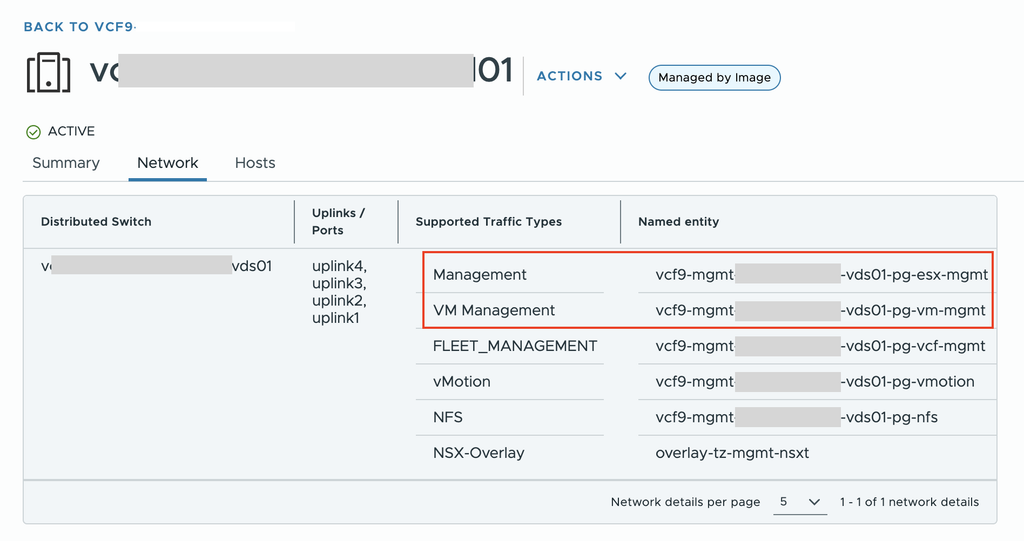
Broadcom explains that the relevant port group must already be present in SDDC Manager inventory and tagged as MANAGEMENT or VM_MANAGEMENT. The reason is that NSX will use this network during the subsequent deployment/configuration process.
Therefore, a custom DVPG that works perfectly well from a traditional vSphere perspective may still fail the VCF import validation.
The workaround
For VCF 9.0.1 and later, Broadcom provides a documented way to bypass this particular guardrail in KB 449685.
Before bypassing the validation, however, you should confirm that:
A vDPG tagged MANAGEMENT or VM_MANAGEMENT exists in SDDC Manager inventory.
The network has sufficient free IP addresses.
The network has connectivity to the vCenter VM being imported.
The environment has sufficient VLAN/IP capacity for the future NSX deployment.
To confirm whether the Management and VM_Management port groups exist in the SDDC Manager inventory, log in to the SDDC Manager GUI, navigate to Workload Domains, select the Management Workload Domain, go to Clusters, select the Management Cluster, and then open the Network tab.
If these requirements cannot be confirmed, Broadcom recommends not bypassing the guardrail, as the scenario should be considered unsupported.