Beta version. The tool is in active development, so expect changes. Your feedback really helps shape it.
Every VCF deployment hits the same question sooner or later: which firewall rules do we actually need?
Why another tool?
There are plenty of port lists and “firewall rule generators” for VMware online, but they tend to share the same problems:
- One row per port, many rows per product. vCenter alone appears dozens of times, and ESX to vCenter is spread across separate rows for 443, 902, 9084 and so on, instead of one rule.
- Inconsistent names. The same component shows up as “vCenter Server”, “VC”, “vCenter Server Management IP address” or “VCSA”, and products appear under old and new names (“VCF Operations for Logs” vs Log Management). You can’t simply filter or group the list.
- No connection to your design. The list doesn’t know whether you run vSAN or FC, one site or two AZs, or shared or separate management VLANs. It also doesn’t know which components you deploy now and which come later.
- Firewall flows mixed with everything else. Traffic that never leaves its VLAN, loopback traffic and products you don’t use sit next to the flows your firewall actually has to allow.
The result is always the same: a long afternoon in a spreadsheet, merging rows and guessing.
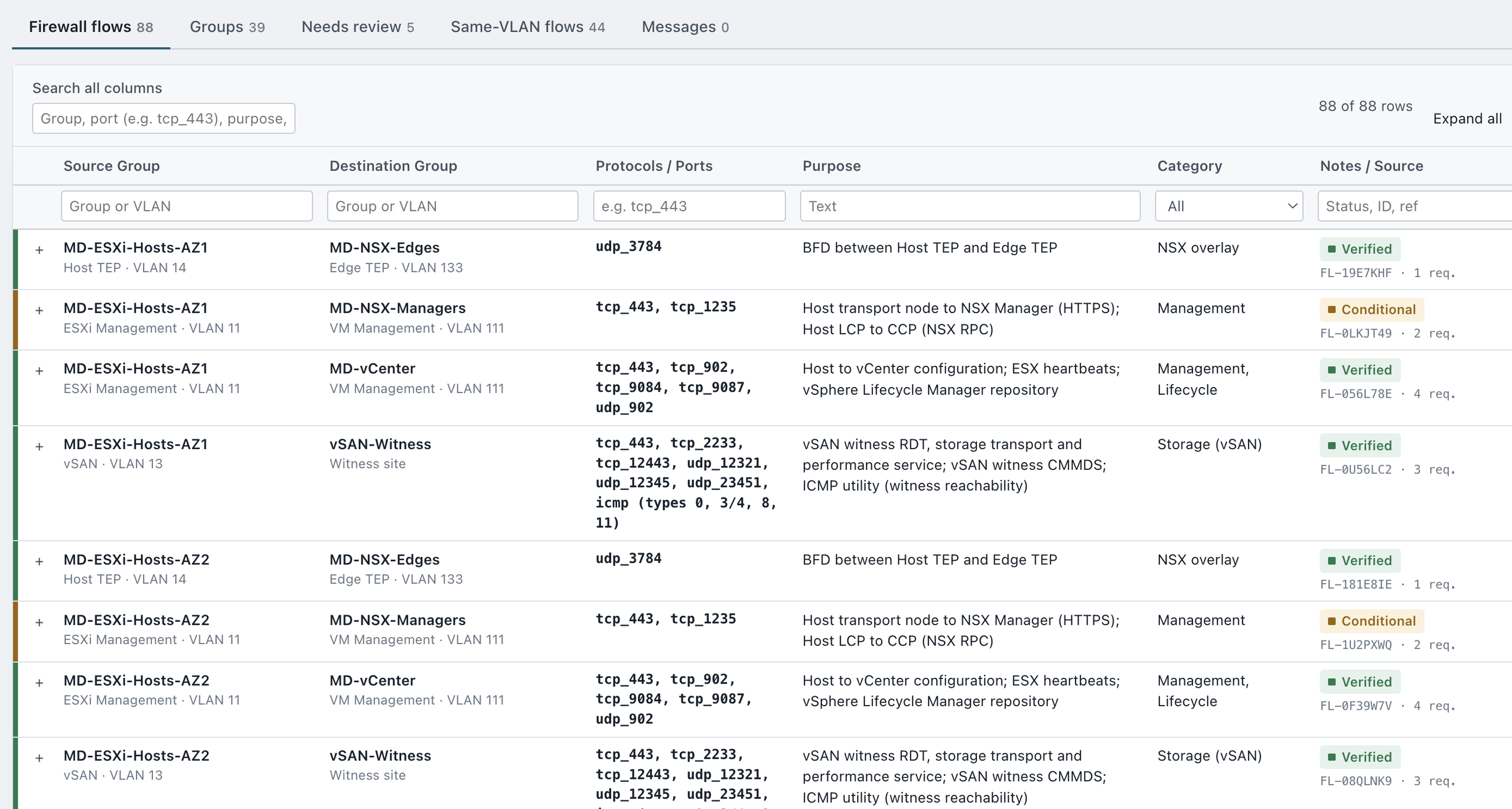
What VCF Firewall Designer does
You describe your design in a short five-step wizard:
- Management Domain: single site or stretched cluster; vSAN or FC (including FC metro); host counts; the components you deploy now and the ones planned for Day-2.
- VLANs: one VLAN ID per network. Stretched networks are handled automatically, and host networks can share one VLAN or use one per AZ.
- Workload Domains: vSAN, vSAN stretched or FC. Each domain can reuse the Management Domain VLANs or have its own.
- External services: DNS and NTP (always included), AD/LDAP, PKI, SMTP, proxy, syslog, backup and Broadcom public URLs.
- Results: one consolidated table of firewall flows.
The tool normalises the vendor names to one name per component and merges all ports per source/destination pair into one row (tcp_443, tcp_902, udp_902). It groups hosts and components automatically, for example MD-ESXi-Hosts-AZ1 or VCF-NSX-Managers. Every row can be expanded to show its members, purpose and the Broadcom source it came from. Rules that need an interpretation or review are clearly labelled, and unverified ones are excluded unless you ask for them.
Inter-VLAN and intra-VLAN flows are kept apart. Based on your VLAN IDs, every flow is classified:
- Inter-VLAN (routed) and external flows cross a router or firewall, for example ESXi Management → VM Management or vCenter → DNS. They go into the Firewall flows table and the exports, and these are the rules your firewall team needs.
- Intra-VLAN flows stay within one VLAN, for example SDDC Manager → NSX Manager when both are on the VM Management Network. They’re listed separately under Same-VLAN flows, so they don’t clutter the rule set, but they stay visible in case you filter inside the segment (for example with NSX DFW).
Change a VLAN ID, for example by splitting VM and VCF Management, and flows move between the two lists automatically.
The results export to an HTML report, an Excel workbook (with intra-VLAN flows on their own sheet) or CSV, ready for the network or security team. You can also save the project as a file and continue later.
Built on vendor data. The rules come from Broadcom’s Ports and Protocols export for VCF 9.1.x, plus the official list of required public URLs.
Private by design. Everything runs in your browser. There’s no account and no tracking, and your project is never sent to a server.
VCF Firewall Designer is a beta version. Any comment, suggestion, bug report or idea is welcome, for example:
- a flow you expected but didn’t find;
- a rule that looks wrong for your design;
- a component or architecture you’d like supported;
- anything in the wizard that’s unclear.
👉 Try it: VCF Firewall Designer
Use the Feedback button in the app (top right). It takes a minute and goes straight to me.